I saw a friend of mine with a link to this YouTube video this morning and thought it was really funny.

Tweet
Google rolls out themes for Gmail
Nov 19, 2008
Today while checking my mail I noticed the interface of my inbox changed so I refreshed thinking it was an error with my browser. Only to see a link, after the page loaded, telling me I can change my theme by going into the settings area. I was blown away.
This new themes feature was released today Nov.19.2008 and Gmail now has 25 themes (Classic, New Blue, Cold Shower, Steel, Minimalist, Green Sky, Bibblegum, Cherry Blossom, Night Shade, Marina, Dusk, Sunset, Silver Lining, Contrast Black, Shiny, Desk, Tree, Summer Ocean, Phantasea, Zoozimps, Candy, Bus Stop, Ninja, Tea & Terminal) excluding the default and you can expect more to come.
Three of the themes were designed by external designers. These are Phantasea Renewal - Matthew Ferreira, Summer Ocean - Jim Honeycutt, and Cherry Blossom - Vania Sofandi. The rest were done internally.

Go ahead and customize your Gmail!
This new themes feature was released today Nov.19.2008 and Gmail now has 25 themes (Classic, New Blue, Cold Shower, Steel, Minimalist, Green Sky, Bibblegum, Cherry Blossom, Night Shade, Marina, Dusk, Sunset, Silver Lining, Contrast Black, Shiny, Desk, Tree, Summer Ocean, Phantasea, Zoozimps, Candy, Bus Stop, Ninja, Tea & Terminal) excluding the default and you can expect more to come.
Three of the themes were designed by external designers. These are Phantasea Renewal - Matthew Ferreira, Summer Ocean - Jim Honeycutt, and Cherry Blossom - Vania Sofandi. The rest were done internally.
Go ahead and customize your Gmail!
Tweet

Navigator v1.1 - CuteNews Template
I recently got some feedback that the template had some minor bugs in IE. So sought to address them and the have been fixed.
Download: Navigator 1.1
Download: Navigator 1.1
Tweet
The Matrix Runs on Windows
Nov 12, 2008
I came across this video today and I think it describes the Windows experience perfectly...
Tweet
 Yesterday, November 11, 2008 Google launched a new feature for Google Talk - Voice & Video conversations. I was elated when I discovered this ant the greatest thing of all is that it's free!
Not all my colleagues have a Skype accounts but a lot of them use Gmail and this new feature with Google Talk will allow us to keep in contact. I also have clients I meet with frequently and this is a way to cut down on my traveling expenses. We can now talk face to face or call each other.
To enable this feature though you have to install a plugin after which you will restart you web browser and should notice a video icon when you login to your Gmail account. Simple start the Voice & Vide conversation by selecting video & more the invite to voice/video chat.
The beauty about this new feature is that it's compliant with internet standards such as XMPP, RTP, and H.264. This means that third-party applications such as iChat can be used to manage and access these new features. Unfortunately there is no version for linux users just yet.
I predict that some where down the line Google will add features that allow users to do presentations and share documents similar to the features of Mac OS X - Leopard, integrating Google Docs.
Voice & Video Chat with GoogleTalk
Yesterday, November 11, 2008 Google launched a new feature for Google Talk - Voice & Video conversations. I was elated when I discovered this ant the greatest thing of all is that it's free!Not all my colleagues have a Skype accounts but a lot of them use Gmail and this new feature with Google Talk will allow us to keep in contact. I also have clients I meet with frequently and this is a way to cut down on my traveling expenses. We can now talk face to face or call each other.
To enable this feature though you have to install a plugin after which you will restart you web browser and should notice a video icon when you login to your Gmail account. Simple start the Voice & Vide conversation by selecting video & more the invite to voice/video chat.
The beauty about this new feature is that it's compliant with internet standards such as XMPP, RTP, and H.264. This means that third-party applications such as iChat can be used to manage and access these new features. Unfortunately there is no version for linux users just yet.
I predict that some where down the line Google will add features that allow users to do presentations and share documents similar to the features of Mac OS X - Leopard, integrating Google Docs.
Tweet
EverSave or SaveCircle for my Mac?
Nov 11, 2008
I like to run a million and one applications on my iMac simultaneously but I always run the risk of one application crashing. In most cases it's Photoshop CS3. Recently I came across two applications that are designed to solve this very issue, EverSave and SaveCircle.
Uncertain which application to choose I decided to run both at different intervals over a 2 week period.
 SaveCircle
I started using SaveCircle and I liked the fact that I could set the time intervals for it to save opened documents for specific applications or the frontmost application. Plus it has a nice interface that allows the user quickly turn on or off the application. SaveCircle also allows the user to detach the countdown window and attach it to the font most application.
SaveCircle's interface overall seemed to take up a little too big for the type of application it was and the countdown window was more of a distraction than an asset. I also found my iMac to move a little sluggish when starting the application and when it was saving a document.
 EverSave
Initially, I was skeptical about using EverSave but I decided to give it a chance.
Once I launched the application I noticed an icon in my menu bar and I was prompted to set my preferences. Once that was done all I had was just an icon that notified me that saving was enabled. The application gave me the option to save specific applications from my list of approved applications along with the option to save based on a timer or when the application was out of focus.
EverSave also has the functionality to save the position of all your opened windows and applications in the event there is a power outage. I also noticed that EverSave used less resources when starting up or saving a document which was excellent.
Both applications are good however over the 2 weeks I found myself gravitating towards one more - EverSave.
Screenshots


screenshots courtesy of Macxtosh and Apple
Uncertain which application to choose I decided to run both at different intervals over a 2 week period.
SaveCircleI started using SaveCircle and I liked the fact that I could set the time intervals for it to save opened documents for specific applications or the frontmost application. Plus it has a nice interface that allows the user quickly turn on or off the application. SaveCircle also allows the user to detach the countdown window and attach it to the font most application.
SaveCircle's interface overall seemed to take up a little too big for the type of application it was and the countdown window was more of a distraction than an asset. I also found my iMac to move a little sluggish when starting the application and when it was saving a document.
EverSaveInitially, I was skeptical about using EverSave but I decided to give it a chance.
Once I launched the application I noticed an icon in my menu bar and I was prompted to set my preferences. Once that was done all I had was just an icon that notified me that saving was enabled. The application gave me the option to save specific applications from my list of approved applications along with the option to save based on a timer or when the application was out of focus.
EverSave also has the functionality to save the position of all your opened windows and applications in the event there is a power outage. I also noticed that EverSave used less resources when starting up or saving a document which was excellent.
Both applications are good however over the 2 weeks I found myself gravitating towards one more - EverSave.
Screenshots
screenshots courtesy of Macxtosh and Apple
Tweet
 When I found that Gmail for mobile 2.0 was released I was eager to install it. However, when I tried to update the version I had - 1.5, I had a bit of a challenge. I got an message asking me if I wanted to update version 1.50 with version 1.50, not 2.0.
I resorted to deleting Gmail for mobile 1.5 from my Nokia 6080b and install 2.0 but was told "File too large to be saved." I was astonished that a 500K application could be installed on a phone with 2.1MB of free space.
After several attempts I reverted to Gmail for mobile 1.5 which took a lot if 'Googling' just to find the application. I was lucky and found a useful link - http://gmail.com/app/v1.5.0/L1/gmail-g.jar. I also tried http://gmail.com/app/gmail.jad?make=BRAND&model=MODEL&ver=v1.5.0.1193.
Back to Gmail for mobile 1.5 for me
Nov 7, 2008
When I found that Gmail for mobile 2.0 was released I was eager to install it. However, when I tried to update the version I had - 1.5, I had a bit of a challenge. I got an message asking me if I wanted to update version 1.50 with version 1.50, not 2.0.I resorted to deleting Gmail for mobile 1.5 from my Nokia 6080b and install 2.0 but was told "File too large to be saved." I was astonished that a 500K application could be installed on a phone with 2.1MB of free space.
After several attempts I reverted to Gmail for mobile 1.5 which took a lot if 'Googling' just to find the application. I was lucky and found a useful link - http://gmail.com/app/v1.5.0/L1/gmail-g.jar. I also tried http://gmail.com/app/gmail.jad?make=BRAND&model=MODEL&ver=v1.5.0.1193.
Tweet
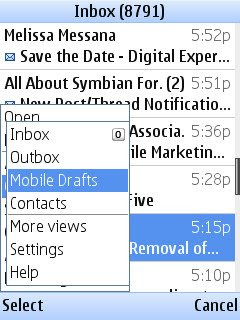 I don't own a smart phone, though I desire to acquire a 3G iPhone, I use a Nokia 6080b which is out-fitted with Gmail's mobile java application - version 1.5. It's one of the many Google products I use. However, I'm elated with the release of Gmail for mobile 2.0.
I have no desire whatsoever to own a Blackberry but with Gmail for mobile I can be more productive while on the road and version 2.0 has features I'm sure I'll benefit from.
What's New in version 2.0
Google has improved the application making it faster, adding support for multiple accounts, allowing multiple drafts to be saved and even offline support - so you can check your most recent mail and send messages in your outbox as soon as you connect.
Version 1.5 of Gmail for mobile was 356.7 KB, worked on phones supporting Java (J2ME /MIDP 2.0) and having a Symbian OS. The latest version does the same however ans is only 500 KB.
To install the application go to m.google.com/mail on your mobile device and follow the instruction.
Watch the video below to learn more about the application!
* FYI - Won't work unless you are on a Data Plan. Contact your service provider if uncertain.
Gmail for mobile 2.0
Nov 5, 2008
I don't own a smart phone, though I desire to acquire a 3G iPhone, I use a Nokia 6080b which is out-fitted with Gmail's mobile java application - version 1.5. It's one of the many Google products I use. However, I'm elated with the release of Gmail for mobile 2.0.I have no desire whatsoever to own a Blackberry but with Gmail for mobile I can be more productive while on the road and version 2.0 has features I'm sure I'll benefit from.
What's New in version 2.0
Google has improved the application making it faster, adding support for multiple accounts, allowing multiple drafts to be saved and even offline support - so you can check your most recent mail and send messages in your outbox as soon as you connect.
Version 1.5 of Gmail for mobile was 356.7 KB, worked on phones supporting Java (J2ME /MIDP 2.0) and having a Symbian OS. The latest version does the same however ans is only 500 KB.
To install the application go to m.google.com/mail on your mobile device and follow the instruction.
Watch the video below to learn more about the application!
* FYI - Won't work unless you are on a Data Plan. Contact your service provider if uncertain.
Subscribe to:
Posts (Atom)