Dell's Studio Hybrid


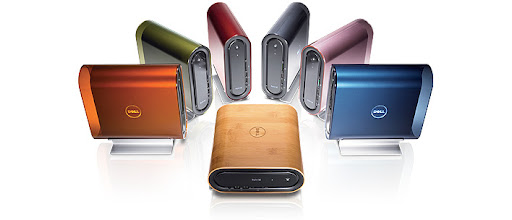
Recently my friends were trying to figure out what type of pc to buy after the motherboard in the clone died. I suggested the Dell Studio Hybrid with a pitch that it would help reduce the clutter and they were loving it.

I must say that I admire Dell's ingenuity! But I must confess that when I saw the device I thought about Apple's Mac Mini except that studio hybrid as several other flavours. Dell's Studio Hybrid cost USD$499.00, a $100 dollars less than their competitor - Apple, and you get 2GB of memory (DDR2), CD/ DVD Burner, 160GB Sata Hard-drive, an Intel Pentium Dual Core Processor (1.86GHz/533Mhz) and Windows Vista Home. Customization is always an option for those who want more from Dell's PC in a lil box, including the addition of a monitor.

Though Dell's Studio Hybrid has the capacity to take up to 4GB of Memory, 320 GB Hard-drive and an 8x CD / DVD Writer, seemingly giving it superiority over it's competitor, it will always fall prey to it's OS and that was what aided my friends in their decision.

Pormotional Video

Dirty Paper - Free Web Template


I designed Dirty Paper to be uploaded at Open Source Web Design but I keep getting an error that the file structure is incorrect when it's not so...Enjoy!

Download: Dirty Paper

ThinkFree Office - MS Office Knock Off

I was looking for an alternative to Neo Office recently, after getting frustrated with trying to find features similar to Microsoft Office, using the GUI. That was when I discovered ThinkFree Office and I tried a demo version.

ThinkFree has several products but somehow I was drawn to try their Office product, available for Windows, Mac, and Linux systems. When I installed the product I noticed my iMac was moving a little sluggish but I ignored it because I had several adobe photoshop files open. Once the installation was done I launched the application, after closing my photoshop files, and my computer was still sluggish only to be greeted by a screen encouraging me to sign up for an account. I ignored the screen continued but was surprised by what came next, an exact replica of MS Office 2007. I was thoroughly disappointed.

As if that initial disappointment was enough I created a document and tried saving it but was forced to create an account and store the file online. If I wanted to store my files online I would use Google Docs.

Unfortunately, I didn't see the need to have a desktop application that requires me to save my files online and as a result of this, I'm back to Neo Office with plans on getting iWork.

4th Generation iPod Nano


Apple
has done it again! As usual Apple throws a curb ball at their competition by tweaking products and making them cheaper. They did just that with the new iPod Nano.

The new iPod Nano (4th Generation) is 0.44 ounces lighter than the previous model, which was a little smaller in dimension. The 3rd & 4th Generation iPod share one thing, screen dimension - 320 x 240, but the 4th Generation doubles the capacity of the previous version 8GB - 16GB and costs only USD$149/199.

Apple ensured that this product fit into the whole idea of thinking green. This new iPod Nano is brominated flame retardant-free, mercury-free, pvc free, has highly recyclable aluminum enclosure and arsenic-free glass

Whats New?
Apple has added a few nifty features like coverflow, closed caption for videos, games, video rotation, genius - a smart playlist creator and a shuffle feature activated by shaking the device.

Take A Tour


The Ad

Super Bolt Wallpaper


Download: Wallpaper

Nike Collage Wallpaper


Download: Wallpaper

Usain Bolt Desktop Wallpaper


Download: Wallpaper

Blackboard - Free Web Template


A very simple template that uses black, white and the shades between.

View: Demo | Download: Blackboard

CuteNews User Manual


A manual designed specifically for training CuteNews end-users.

Download: CuteNews Basic User Manual

Slick v1.0 - CuteNews Template


This template is a a Remix of CuteNews default template.

Download: Slick

Lime v1.0 - Wordpress, Joomla & CuteNews Template


Download: Wordpress | Joomla 1.0

There is also a template I did for CuteNews with the same name.
Download: Lime for CuteNews

Cushy CMS - Contnet Management Made Easier

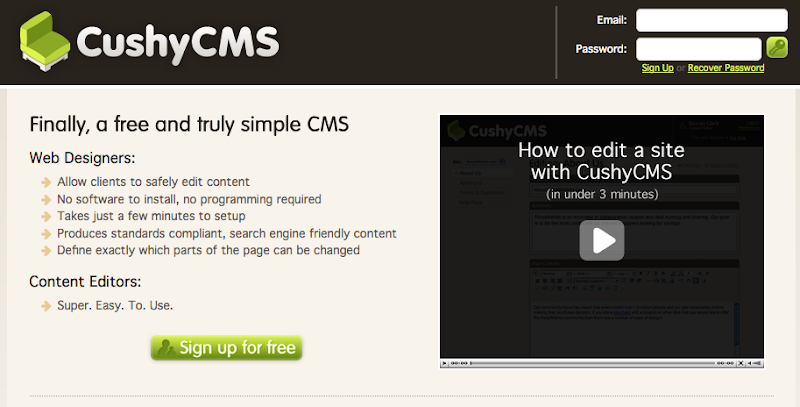
As a web designer you have to assess each project and design systems that are effective and affordable. Not all clients can afford a complex Content Management System (CMS) and that is where Cushy CMS comes into play.

Cushy CMS is for designers who don't want much to do with code and it's free.

Setting up the CMS is very simple. After creating an account you'll be required to add a website (url & ftp info), add webpages to be edited by Cushy and then editable areas. The areas to be edited by Cushy are defined by using a class - "cushycms" - on desired html tags.

Designers have the opportunity to capitalize on this by registering for the pro version of Cushy CMS, for USD$28 per month, which allows them to a add a custom domain, logo, colour schemes and unlimited webistes using the CMS.

Cushy CMS is ideal for freelance designers.

Transparent PNGs and Internet Explorer

Recently I was in a meeting with some colleagues discussing a project, while we waited on the client we started talking about web development issues. One of the issues that came up was the use of transparent pngs and Internet Explorer. Now I'm aware that IE 7 and IE 8 beta have corrected this issue. Unfortunately, not a lot of people have switched from IE 6 in a developing country like Jamaica so designers like myself still have this issue to deal with.

There are many fixes for this one issue - javascripts, using a .htc file, css hacks or IE specific stylesheets - but we discovered two others. One is using a 8-png file which works perfectly and the other is using a pseudo transparent gif. The gif is 4px x 4px with one black square in the top left corner and another in the bottom right corner, repeat the image in your css file as a background and you are good to go.

Songbeat - Seach, Play and Download Music

I came across this application Songbeat which is a web based music player that runs on your desktop. Songbeat searches for songs that are leagally available on the internet and allows you to play them and even download them.

Is it safe? Is it legal? It is and the Songbeat doesn't need access to your hardrive or music folders. With the free version of Songbeat you get 50 downloads and it's supported by ads but you can get Songbeat Pro by paying €10 for the whole year.

Currently there is only a pc version but a mac version is in the pipelines.

Download: Songbeat

Ubiquity - Mashups at it's Best

Mozilla Labs launched Ubuqity recently. It's a addon (prototype) for Firefox which allows users access to a plethora of webservices by using simple commands. Ubiquity unleashes great power, by typing easy to remember commands users can insert maps into e-mails, transilating webpages on the fly, look-up information in dictionaries and wikis, plus a lot more. To see what Ubiquity can reall do watch the video below.

Collaborate on Creative Projects


More and more people are working from home/virtual offices but have to collaborate with associates and clients on projects. Meetings can be time consuming, especially if it's just to discuss small changes in design and every minute counts. I've found two solutions that help to make the feedback process on creative projects a lot much easier - ConceptShare and ProofHQ.

Both ConceptShare and ProofHQ are similar to Octopz. Unfortunately the interface for Octopz is not as intuative, as the 2 I mentioned above, or offers a free personal account.

ConceptShare allows creative teams to create a workspace for each project with description and client name. Packages determine how many projects can be active simultaneously, 35 being the most with the Business Package for USD$99/month and 5GB of storage. With ConceptShare you can review from photos to video files and everything else in between. Once the client has signed off you can print out the workspace with all the comments for reference.

ConceptShare also makes it easier to upload files from your desktop with a new aplication, ConceptShare Desktop Companion, written with Adobe Air.

ProofHQ is on par with ConceptShare in terms of features and cost except that it doesn't support video files. Approval of proofs are a more explicit with ProofHQ by simply selecting a button that says "Approve" or "Approved with Changes" when viewing the proof.

Unlike ConceptShare, ProofHQ allows the administrator to send a public url which allows viewers to see the proof without the need for a password. ProofHQ also integrates with 37Signals' BaseCamp. The most expensive plan on ProofHQ cost the same as ConceptShare with 1GB less but allows you to have over 200 proofs.

These web services have made life easier for creative professionals who want to get the most out of their time and ensure that the clients get what they desire, avoiding any miscommunication.

You've been equipped now choose which one is suitable for you!